

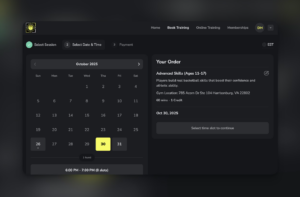
Search “sports scheduling software” and here’s what you get: tools for scheduling league games. SportsEngine. TeamSideline. LeagueLobster. Every result on the first page is built for the person managing 24 youth soccer teams, assigning game fields, and generating tournament brackets.
If you run a private training facility or independent coaching business, that entire page is useless to you. You need something completely different, and this guide covers exactly that.
Below, you’ll find what sports scheduling software actually means for private coaches, what features matter, and a straightforward comparison of the best tools available in 2026. The youth sports market is projected to reach $69.4 billion by 2029, and with more athletes than ever in private training programs, getting your scheduling right isn’t optional. It’s how you grow.
What sports scheduling software actually means for private coaches
There are two completely different categories of “sports scheduling software,” and most coaches don’t realize the distinction until they’ve spent weeks fighting a tool that was never built for them.
League scheduling software is designed for organizing games, seasons, and tournaments. You set up teams, assign game times, manage field availability across an entire organization, and generate schedules for dozens or hundreds of teams at once. Tools like SportsEngine, TeamSideline, and LeagueLobster are excellent at this. They’re also completely wrong if you’re a basketball trainer with 40 athletes who need 1-on-1 booking.
Training facility scheduling software is built for private coaching businesses. You set your availability, create schedulers for different session types (1-on-1 training, small groups, assessments), let athletes book individual sessions through a portal, collect payment when they book, and manage who has credits and who needs to renew.
The features that matter are entirely different. League software cares about bracket generation and field assignments. Coaching software cares about credit packs, recurring bookings, no-show protection, and athlete management.
According to the Aspen Institute’s Project Play, roughly 75% of youth athletes participate in organized sports, and private training has become a significant part of that ecosystem. That’s a lot of coaches trying to manage bookings through Google Calendar and Instagram DMs. There’s a better way.
This distinction matters because picking the wrong category of software sets you back months. So let’s focus on what private coaches and training facilities actually need.

What to look for in sports scheduling software for training facilities
Not all coaching scheduling tools are built equally. Here are the features that actually determine whether a system works for your facility.
Session booking that works for individual athletes (not teams)
The core of any facility scheduling system is getting athletes onto your calendar without back-and-forth text exchanges. Athletes should see your availability, pick a session type, select a time, and book it, all without involving you.
Generic booking tools like Calendly miss important details for coaching businesses: session capacity (you may take 1-on-1 or groups of three), booking windows (you want 24 hours notice minimum), and session type restrictions (not all athletes should access every scheduler you create).
Look for a system that lets you configure each scheduler with its own rules: capacity, duration, advance booking requirements, and access permissions.
Integrated payment collection
Collecting payment separately from booking is a recipe for chasing payments every week. The best scheduling tools collect payment at the time of booking, so you never follow up after a session.
That means either charging a card at booking or requiring athletes to spend credits they’ve already purchased. Either way, you get paid before you set foot on the court.
Credit-based scheduling for session packs
This deserves its own section later, but credit-based booking is the single biggest differentiator between generic scheduling tools and purpose-built coaching software.
Athletes purchase a session pack upfront, stored as credits in their account. When they book, credits are deducted automatically. You get paid once, in advance, and athletes book on their schedule. Most facilities that switch to this model see no-show rates drop by 60 to 80 percent almost immediately.
Recurring bookings for regular clients
Your best athletes train on a consistent schedule. A good scheduling tool supports recurring bookings: an athlete books “every Tuesday at 4pm” once and it populates your calendar automatically for the next 8 or 12 weeks.
Without recurring bookings, you’re re-confirming schedules every week. That’s a waste of time for you and an annoyance for your athletes.
Multi-coach support and staff scheduling
If you run a facility with more than one coach, you need a system that handles multiple schedules at once. Each coach manages their own availability and schedulers. Athletes book with a specific coach. You, as the facility owner, have visibility across everyone’s calendar.
This is where single-user booking tools like Calendly completely break down for growing facilities. They’re built for one person. A facility with three coaches needs a coach scheduling app that handles multiple separate schedules in one place. CoachIQ’s guide to managing availability for multiple coaches walks through the exact setup.
Automated reminders to cut no-shows
No-shows cost training facilities an estimated 15 to 20 percent of revenue annually. The simplest fix is automated reminders: a confirmation when someone books, a reminder 24 hours before, and a reminder one hour out.
Good scheduling software handles this automatically. You configure it once and it runs forever. Look for a system that triggers reminders based on booking events, not just calendar invites.
The best sports scheduling software for training facilities in 2026
Here’s how the top options compare for private coaching businesses and training facilities. This comparison focuses on coaching and facility scheduling tools, not league management software.
| Feature | CoachIQ | Upper Hand | Mindbody | EZFacility |
|---|---|---|---|---|
| Built for sports coaching | Yes | Yes | Partially | Partially |
| Credit-based booking | Yes | Limited | Yes | Yes |
| Athlete self-booking portal | Yes | Yes | Yes | Yes |
| Multi-coach support | Yes | Yes | Yes | Yes |
| Recurring bookings | Yes | Yes | Yes | Yes |
| Automated reminders | Yes | Yes | Yes | Yes |
| Website builder included | Yes | Extra cost | No | No |
| All-in-one platform | Yes | Partial | No | No |
| Starting price | ~$69/mo | $79/mo | $139/mo | Custom |
CoachIQ is purpose-built for private sports coaching businesses. The entire platform, including its terminology and workflow, is designed around how coaching facilities actually run: athletes (not clients), sessions (not appointments), schedulers (not booking pages), and credits (not tokens). It includes scheduling built for coaches, payments, a full athlete self-booking portal, website builder, automations, and communication tools in one platform. Around 450 coaching businesses use it across basketball, baseball, soccer, tennis, football, and more.
Upper Hand is the most direct competitor in the sports-specific software space. It’s a capable platform with strong AI features, though pricing runs higher and some capabilities are gated to enterprise tiers. Worth evaluating for larger facilities.
Mindbody is dominant in wellness and fitness, and technically usable for sports coaching. The challenge is that it was built for yoga studios and gyms, not private sports training. The marketplace model, where athletes discover classes through the Mindbody app, creates a dependency that most sports coaches don’t want. Pricing also gets steep for smaller operations.
EZFacility is the legacy option, built for larger facilities that manage court and field rentals. It’s a capable system, but the interface shows its age and the product is designed more for facility-wide resource management than individual coach scheduling.
For most private coaches and small-to-medium training facilities, CoachIQ is the strongest fit. The workflow matches how coaching businesses actually operate, and everything connects: a booking creates a payment record, triggers a confirmation, updates the athlete’s credit balance, and adds the session to the calendar automatically.
Ready to test it with your own setup? Start your free CoachIQ trial and get your first scheduler live in under 10 minutes.
How credit-based scheduling changes the game for facility owners
Marcus runs a basketball training facility outside Atlanta. For his first two years, he used a pay-per-session model: athletes booked, he trained them, then sent a Venmo request. Simple enough at 20 athletes.
By the time he hit 50 athletes, Monday mornings looked like this: scroll through the weekend’s sessions, count who owed him, send a round of payment reminders, wait, follow up again. Some athletes paid immediately. Some took three days. A few ghosted him entirely. His no-show rate was sitting at around 20 percent.
He switched to credit-based booking in January 2025. Athletes now purchase a 10-session pack for $750 before they can book anything. Credits deduct automatically at booking. Marcus collects payment once, upfront, in a lump sum.
Within two months, his no-show rate dropped to under 5 percent. His Monday mornings shifted from payment chasing to reviewing the week’s schedule and planning training sessions.
Here’s how the model works:
- Create a credit product with a set number of credits (for example, 10 credits for $750)
- Athletes purchase the pack through their portal using a credit card
- When they book a session, credits deduct from their balance automatically
- You get paid upfront, and athletes book on their own schedule as credits allow
The credit model also makes revenue more predictable. Instead of hoping athletes show up and pay after each session, you’re collecting payment in advance and managing a credit balance. It’s the difference between reactive revenue and planned revenue.
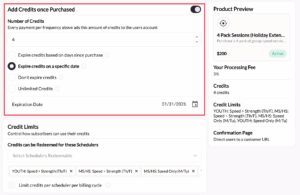
Learn how credit-based scheduling works in CoachIQ, including how to set up credit products, configure usage restrictions, and manage athlete balances.
Setting up scheduling for your training facility: step by step
If you’re starting fresh with sports scheduling software for your facility, here’s the sequence that works for most coaches.
Step 1: Set your availability
Block out the times when you’re open for booking. Think of this as your office hours: the windows when athletes can request sessions. Be honest about how many sessions you can take per day before quality drops.
Step 2: Create schedulers for your session types
A scheduler is a template for a specific type of booking. Create one for 1-on-1 training (60 minutes, one athlete, requires credits), one for small group sessions (60 minutes, up to four athletes), and one for assessments (30 minutes, first-time athletes only, if you want).
Each scheduler has its own capacity, duration, pricing, and booking rules. Creating your first scheduler takes about five minutes once your availability is set.
Step 3: Enable athlete self-booking
Share your booking link via text, email, or your facility website. Athletes pick their session type, choose a time, confirm, and pay. No back-and-forth required.
Step 4: Connect payment collection
Link your Stripe account to collect payments automatically at booking, or when athletes purchase credit packs. A five-minute setup that eliminates payment chasing from your workflow permanently.
Step 5: Set up automated reminders
Configure automated session reminders to fire at booking confirmation, 24 hours before, and one hour before each session. Set it once and forget it.
Step 6: Set up recurring bookings for regulars
For athletes who train on a consistent schedule, set up recurring bookings so they’re blocked on your calendar automatically. No more re-confirming the same schedule week after week.
Step 7: Share your booking link everywhere
Add your scheduling link to your facility website, Instagram bio, and email signature. Any athlete interested in booking should be one click away from your scheduler.
Common scheduling problems (and how to solve them)
Athletes no-show constantly. Implement credit-based booking or require a deposit at the time of booking. When athletes have paid upfront, canceling means forfeiting money already spent. Facilities that make this switch typically see no-show rates fall below 5 percent.
Double-booking coaches. Each coach needs their own scheduler with their own availability blocks. The system prevents two athletes from booking the same coach at the same time automatically. If you’re running double-bookings, you’re using a tool without proper multi-coach support.
Chasing payments after every session. Collect payment at booking. This is a mindset shift as much as a software change. Require athletes to hold credits before they can access any scheduler. Payment happens at purchase, not after the session.
Last-minute cancellations disrupting your schedule. Set a cancellation policy and enforce it through your scheduling software. A common approach: cancellations with less than 24 hours notice result in credit forfeiture. Athletes who know this in advance cancel far less often.
Managing different pricing for different athletes. Use scheduler-level access controls and credit restrictions. Create schedulers accessible only to athletes who’ve purchased specific credit products. Elite athletes get elite training slots. New athletes book standard sessions.
Frequently asked questions
What is the best scheduling software for sports coaches?
The best sports scheduling software for coaches depends on your business type. For private training facilities and independent coaches, CoachIQ is purpose-built sports booking software with credit-based booking, athlete self-scheduling, and integrated payments. For league and tournament management, tools like SportsEngine or TeamSideline are the right fit. The most important distinction: coaching software and league software solve completely different problems for completely different audiences.
How do I reduce no-shows at my training facility?
The most effective no-show reduction strategy is credit-based booking: athletes purchase sessions upfront, so canceling means forfeiting credits they’ve already paid for. Pair this with automated reminders at 24 hours and one hour before each session. Facilities that combine both typically see no-show rates drop to under 5 percent.
What’s the difference between sports league software and training facility software?
League software (SportsEngine, TeamSideline, LeagueLobster) handles game scheduling, tournament brackets, field assignments, and team rosters for organized leagues. Training facility software (CoachIQ, Upper Hand, Mindbody) handles individual session booking, payment collection, credit packs, athlete management, and coach scheduling for private training businesses. They solve completely different problems.
Can I use free scheduling software for my coaching business?
Free tools like Calendly or Google Calendar can get you started, but they’re missing the features that make coaching businesses run efficiently: credit-based booking, athlete portals, integrated payments, and multi-coach management. Most facility owners hit a wall somewhere between 20 and 40 athletes, when manual scheduling and payment chasing stops being manageable. A purpose-built tool pays for itself quickly in time saved and no-shows prevented.
How does credit-based scheduling work?
Athletes purchase a credit pack (for example, 10 sessions for $750) through your athlete portal. Credits are stored in their account. When they book a session, credits deduct automatically. You get paid when they purchase the pack, not per session. Unused credits can roll over or expire according to the policy you set. This model improves cash flow, reduces no-shows, and eliminates payment chasing entirely.
The right tool makes scheduling simpler
Here’s the reality: most sports scheduling software was never built for you. The tools that rank highest in search results are built for league administrators scheduling games across entire organizations. They solve a legitimate problem. Just not yours.
If you run a private training facility or a coaching business, what you need is a system that books individual athletes, collects payment upfront, manages credit balances, and handles reminders without your involvement. That’s a different product category, and finding it means knowing what to search for.
CoachIQ is built specifically for private coaching businesses. Not borrowed from wellness software. Not adapted from league management tools. Built from scratch for training facilities, with the language, workflows, and features that match how coaching businesses actually run.
See CoachIQ pricing or book a live walkthrough to see how the scheduling system works with your actual training setup.
